

VISIBLE ITEM NAME
JENCHA Demo Collection #1
- Background
- Warm Sand
- Skin
- Amber
- Eyes
- Classic
- Clothes
- Utility Jacket
- Headwear
- Explorer Cap
Matching filenames. A human-readable item name.
NATIVE PIXEL ART & COLLECTION BUILDER
AVAILABLE NOW01 / DRAW
Create crisp pixel art from the first pixel to the finished character. Made for your Mac.

All drawing tools are Free: Pencil, Eraser, Fill, Line and Shapes. Select, copy, paste and move. The tools to make every pixel count.
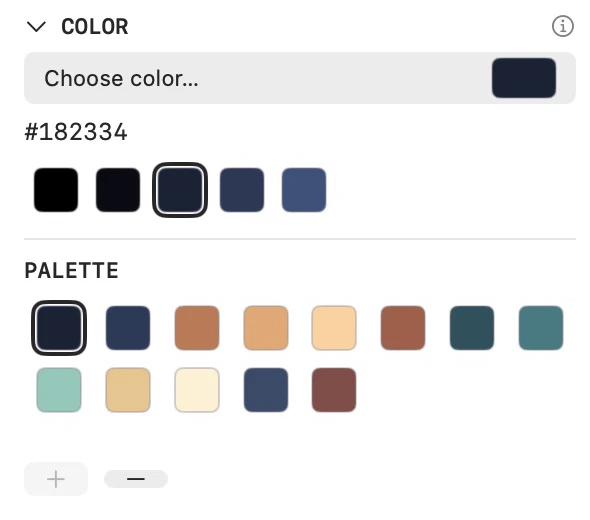
Quick Shades, your project palette and the Eyedropper keep color close at hand.
02 / ORGANIZE
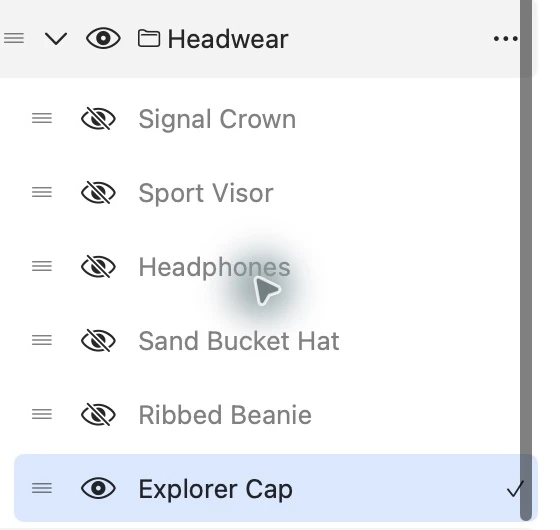
Organize backgrounds, eyes, clothes and headwear in groups. Keep every variant editable. Turn your layer structure into collection-ready traits.


TRY A VARIANT
GROUP HEADWEARSwitch a layer. Change the look. Keep the rest.
03 / BUILD
Configure your groups and preview the mix for free. With Pro, generate complete collections of unique artwork from your editable source.
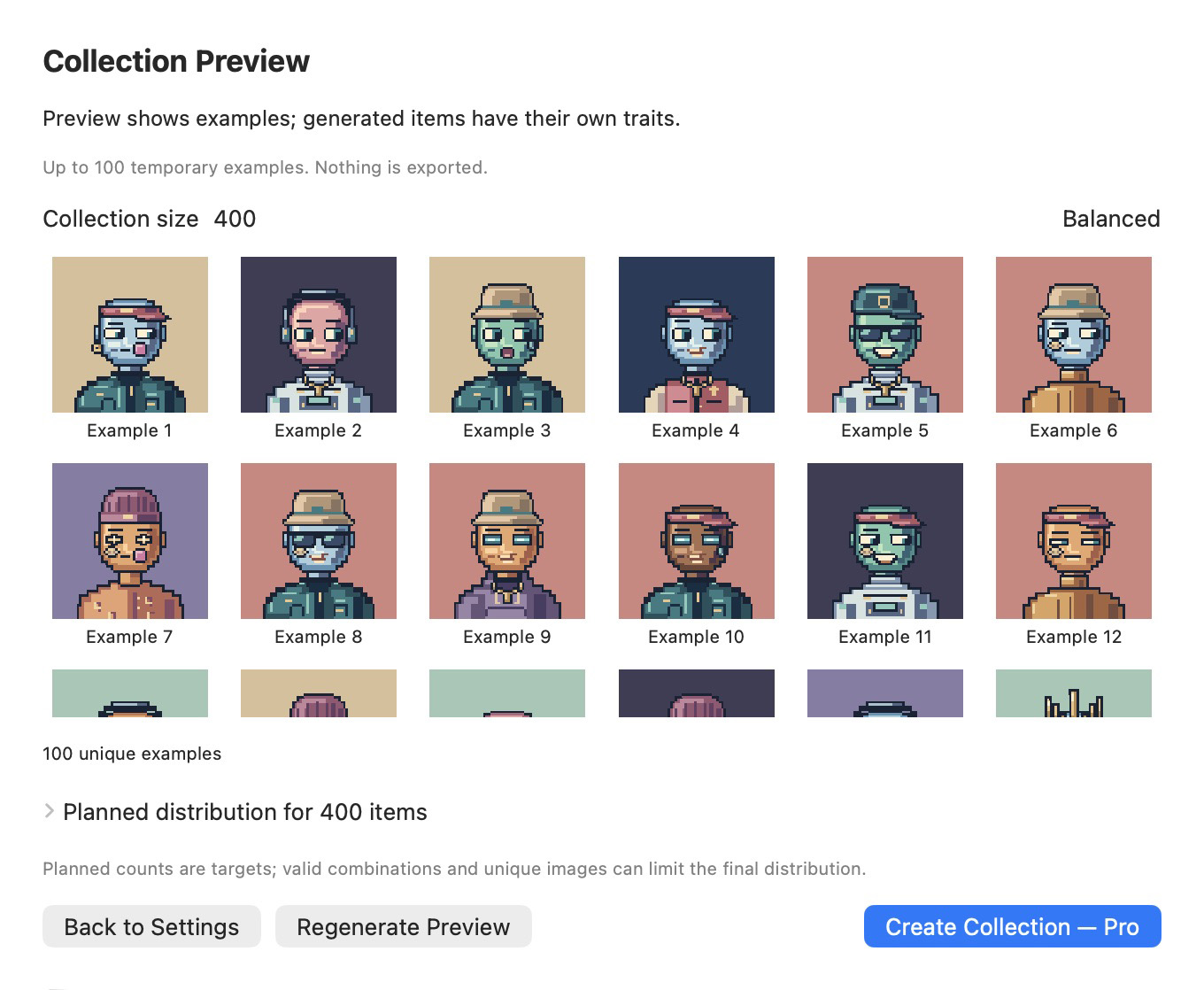
Set Required, Optional or Fixed for each group. Preview Balanced, Random or Weighted for free.
Explore Collection Builder00001 00002
 00003
 00004
 00005
 00006
 00007
 00008
 00009
 00010
 00011
 00012
Possible combinations are theoretical. Different combinations can produce the same image; duplicate detection keeps only unique artwork.
04 / CURATED + GENERATIVE
With Pro, generate a collection, hand-pick a favorite, or come back and make it bigger. Create as many collections as you want, with up to 10,000 items per collection.
Generate a new collection.
Add a hand-picked item.
Continue where generation stopped.
Grow an existing collection later.
Existing items stay untouched. Extend adds new, unique items using your collection’s saved source.
05 / EXPORT
Export individual artwork as PNG with optional metadata for free. With Pro, generate matching artwork and metadata for every item in a complete collection.
ONE ITEM. THREE MATCHING FILES.
JENCHA Demo Collection-00001.pngJENCHA Demo Collection-00001.jsonJENCHA Demo Collection-00001.jsonSeparate metadata formats for Bitcoin inscriptions and NFT marketplaces. Export files locally, then choose where to use them. Compatibility depends on the receiving platform.
See how export worksMatching filenames. A human-readable item name.
06 / macOS

Your artwork stays local on your Mac. Editable .jenchapixel projects keep your layers and Project Details together.
Pixel-perfect PNG output, with integer scaling and transparency.
Native controls and keyboard shortcuts. English and Dutch app interfaces.
07 / FREE & PRO
Create pixel art for free. Go Pro when you're ready to generate and export complete collections.
Free
Free to download and use without a subscription. Use the complete pixel-art editor, save your projects, export individual artwork with optional metadata, and preview collection setups locally with up to 100 temporary items.
Pro
Create as many collections as you want, with up to 10,000 items per collection. Generate matching artwork and metadata, and use Add, Resume and Extend to keep building them.
€24.99 per month through Apple. No free trial or introductory offer. The app shows the current price for your App Store region before you confirm. It renews automatically every month until canceled.
Canceling stops renewal; Pro stays active until the paid period ends. After that, the full Free editor remains available. Projects stay editable, and existing exports stay yours. Nothing is deleted, locked or watermarked.
Explore the free preview08 / FAQ
The complete pixel editor: tools, selections, layers, groups, Quick Shades, PNG import, Project Details, traits and project saving. Single Item PNG export with both optional JSON formats, collection setup and local Collection Preview are also Free.
Pro unlocks permanent collection production: Create Collection, Add to Collection, Resume Collection and Extend Collection. It includes bulk PNG and metadata output, automatic numbering and collection-wide duplicate checks.
Yes, in both Free and Pro. Configure the real collection target, group roles and Balanced, Random or Weighted distribution, then choose Preview Collection. No destination folder is needed.
No. It creates temporary local examples, with no saved PNG/JSON files, manifest or permanent collection state. Regenerate Preview replaces the examples; closing removes them. Back to Settings keeps your settings while the configuration screen remains open. A preview cannot be continued with Add, Resume or Extend.
A preview is a sample to check your artwork before production. It shows up to 100 unique examples, or fewer for a smaller target or duplicate-heavy artwork. Set the full target first: 10% of 3,000 plans 300 items. Balanced and Weighted planned counts refer to that full target, not the sample. The sample does not guarantee the final mix; Random does not guarantee exact percentages.
Yes. Create as many collections as you want, with up to 10,000 items in each collection. Each collection still depends on the unique artwork your source can produce.
No. The limit is 10,000 items per collection. It is not a monthly allowance or a total across all your collections.
The app returns to Free, including the complete editable pixel editor and Single Item export. Starting a new permanent Create, Add, Resume or Extend action requires active Pro. An already authorized generation can finish safely.
No. Projects remain fully editable and existing collection output stays yours. Nothing is deleted, locked or watermarked when Pro ends. Keep backups of your own files.
Choose Restore Purchases in the JENCHA Pixel application menu or Pro window. Apple checks purchases for your Apple Account. Use the account used for the subscription. If an active Pro subscription is found, access is restored; otherwise Free remains available. Restoring does not start production.
Choose Manage Subscription… in the JENCHA Pixel application menu or Pro window to open Mac App Store subscriptions. Canceling stops automatic renewal. Pro remains active until the end of the paid period.
No. Your artwork stays local on your Mac. JENCHA Pixel does not upload your artwork or projects to JENCHA. You choose where to save your files.
No JENCHA account is required to create, save, export individual artwork or preview a collection. Apple handles Pro purchases and subscription management through your Apple Account.
Create pixel art for free. Go Pro when you're ready to generate and export complete collections.
JENCHA Pixel 1.0 for macOS
JENCHA Pixel 1.0 is now available on the Mac App Store.
Free to download. Free editor and local previews. Optional monthly Pro for collection production.